FDE Scope
The complete on-site operating system for a Forward Deployed Engineer.
From first gemba walk to signed-off handoff — across software/SaaS and
embodied-robotics / manufacturing. Built on AgentScope 2.0.







FDE is 2026's hottest AI role (OpenAI, Anthropic, Google, Palantir all build FDE
teams; listings up ~7× YoY). But every FDE shows up to a customer site and
rebuilds the same workflow from scratch — and most teams only model the "build"
half, skipping the pre-engagement, operationalization, and handoff zones that
actually decide whether the engagement produces value.
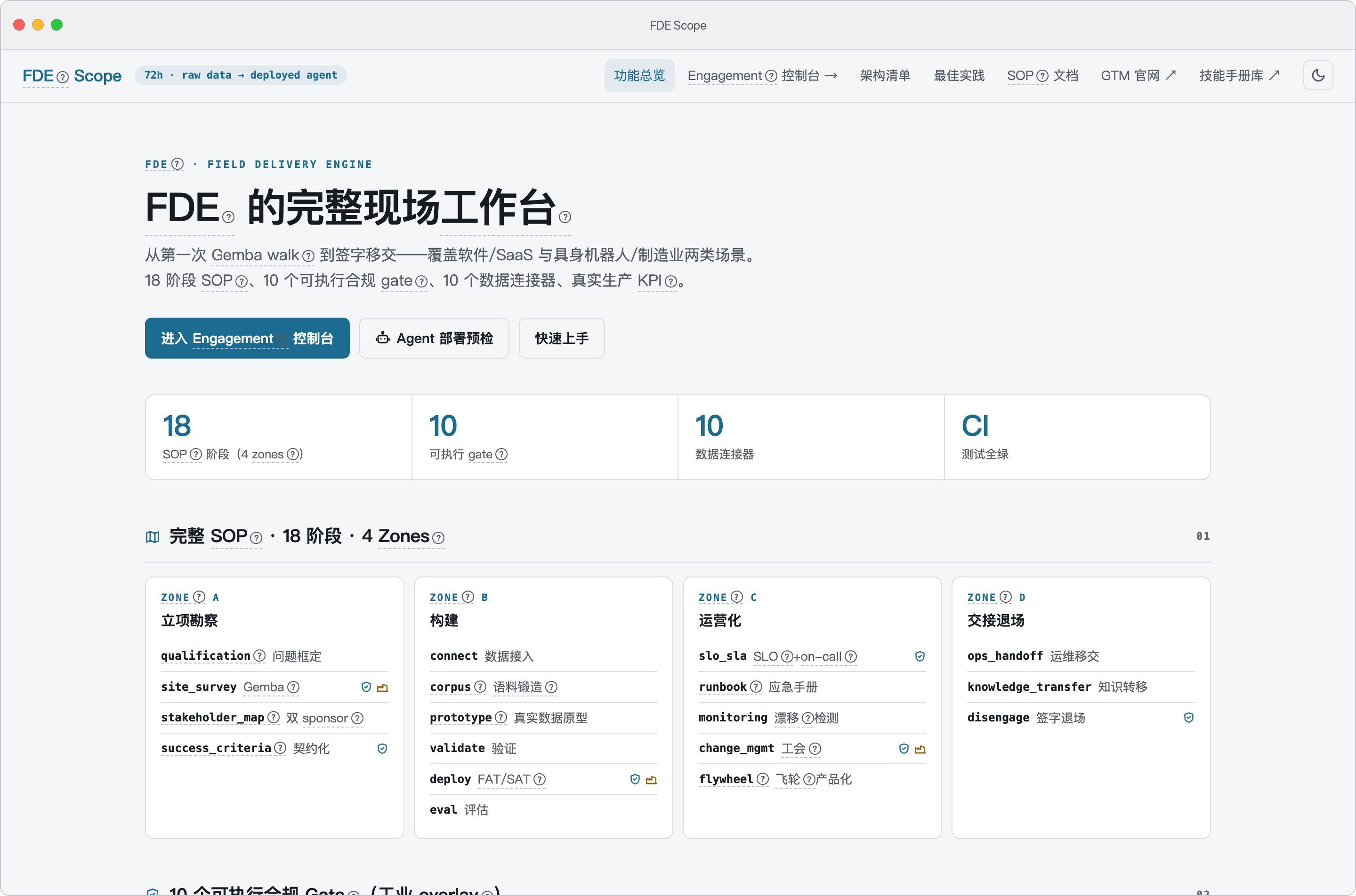
FDE Scope codifies the full FDE standard operating procedure — 4 zones,
18 phases — into an executable, gate-enforced state machine, with a parallel
industrial overlay (FAT/SAT, functional safety, CE/EU-AI-Act, works council,
air-gap, shift handover) for manufacturing/robotics deployments.
flowchart LR
    subgraph ZA["Zone A · Pre-engagement — 定边界"]
        direction TB
        P1["1 立项框定 qualification"] --> P2["2 现场勘察 site survey 🏭<br/>gate: site_survey"]
        P2 --> P3["3 干系人地图 stakeholder map"]
        P3 --> P4["4 成功标准契约化 success criteria<br/>gate: success_criteria"]
    end
    subgraph ZB["Zone B · Build — 造出来"]
        direction TB
        P5["5 数据接入 connect 🏭<br/>gate: air_gap"] --> P6["6 语料锻造 corpus"]
        P6 --> P7["7 真实数据原型 prototype-real"]
        P7 --> P8["8 干系人验证 validate"]
        P8 --> P9["9 部署上线 deploy 🏭<br/>gates: fat_sat · functional_safety · conformity"]
        P9 --> P10["10 评估交付 eval"]
    end
    subgraph ZC["Zone C · Operationalization — 稳得住"]
        direction TB
        P11["11 SLO/SLA + on-call<br/>gates: slo · shift_handover 🏭"] --> P12["12 Runbook 编写"]
        P12 --> P13["13 监控与漂移 monitoring / drift"]
        P13 --> P14["14 变更管理 + 培训 🏭<br/>gate: works_council"]
        P14 --> P15["15 飞轮 → 产品化 flywheel"]
    end
    subgraph ZD["Zone D · Handoff — 交得出去"]
        direction TB
        P16["16 运维移交 ops handoff"] --> P17["17 知识转移 knowledge transfer"]
        P17 --> P18["18 退场 disengage · 客户签收<br/>gate: handoff_signoff"]
    end
    ZA --> ZB --> ZC --> ZD

    classDef ind fill:#fdecea,stroke:#c0392b;
    class P2,P5,P9,P11,P14 ind
🏭 红色 = industrial-only,仅 manufacturing profile 执行(ticket 跑 15 个阶段);
每个 gate: 挂在"离开该阶段"的动作上,advance 时实时重评,不达标不放行。
逐阶段说明见 docs/features.md。
It is not an agent application — it's an FDE's workbench: a CLI, a Web UI,
and a Python library that turns the SOP from a checklist into enforced engineering.
⏱ 最短安装路径 · The shortest path in
先说结论,因为它不好听:本项目没有"一条命令装完"的路径。实测于 2026-10-08(工具实测档):
PyPI 上 fde-scope 与 fde_scope 均返回 404(未发布),仓库 releases 列表为空(无预打包产物)。
对照开源同行的 npx 一键分发,这条差距被如实记在 course-level-1/24 §6 第 2/3 条,
并作为短板登记在 course-level-1/13 §6 第 11 项。
按"你想干什么"选一条最短的:
| 你想干什么 | 最短路径 | 前置 |
|---|---|---|
| 只读课程,什么都不装 | 直接在 GitHub 读 course-level-1/ 下的 Markdown(Level 1 全本,¥0 永久公开) |
会点链接 |
| 跑通一条链路(学员 / 评估者) | git clone → uv sync → uv run fde-scope course doctor |
Python ≥3.11 + uv |
| 没有 uv | git clone → python -m venv .venv && source .venv/bin/activate && pip install -e ".[dev]" |
Python ≥3.11 |
| 要界面 | 上面任一条之后:fde-scope web → http://127.0.0.1:8080 |
— |
course doctor 是开工前自检:它检查环境、示例数据与零 key 路径,跑完给你 G0 的通过/提醒/失败计数——
不通的地方它会说缺什么。全程不要 Docker、不要 GPU、不要 API key
(课程侧的承诺见 11 §4.1 与 13 §1.3)。
关于 agent 运行时中立:本项目只服务自己的 CLI / Web / 库,没有为 Cursor、Copilot 之类的
第三方 agent 提供适配层。课程产物本身是 Markdown 与 JSON,可以带进任何工具——
但"带进去之后还帮你判门禁"这件事,目前只有fde-scope自己做。差距与计划见
24§6 第 3 条。
📸 At a glance
📑 Table of contents
- What makes it different
- Quick start · Web UI · Mock demo data
- Feature checklist
- Architecture · The 10 phase gates · Repository layout
- Engineering best practices
- CLI reference
- 多 Agent 生产(AgentScope 2.0)
- QwenPaw 集成
- Skill 沉淀(Skills / Methodology capture)
- FDE 工作台(Workbench + 现场记录)
- LLM 接入(可选)
- Tests
- Installation · macOS App
- Documentation
- 加强计划(Enhancement Plan)
- Roadmap
- Contributing
- License
- Acknowledgements
✨ What makes it different
- Full SOP, not just "5 steps". The naive connect→corpus→deploy→eval→flywheel
model covers only the Build zone. FDE Scope adds the 4 pre-engagement phases,
5 operationalization phases, and 3 handoff phases that most teams skip — and
enforces them with phase gates. Themanufacturingprofile runs the full
18 phases; theticketprofile runs the 15 SaaS-relevant ones. See
docs/fde_sop_full.md. - A real industrial overlay. Manufacturing/robotics engagements hit gates
that SaaS never does: FAT/SAT acceptance, functional safety
(ISO 13849 / IEC 61508 / ISO 10218), CE/EU-AI-Act conformity, German works-council
co-determination (BetrVG §87), air-gapped deployment, shift handover. Each is
an executableGate.check()— it blocks advancement when blockers are present. - Scenario profiles.
ticket(customer service) andmanufacturing
(embodied-robotics factory) share one engine but differ in connectors, KPIs,
and which gates apply. Manufacturing reports real production KPIs: OEE, MTBF/
MTTR, FPY/DPMO, grasp success rate, collision/intervention rate. - Built on real AgentScope 2.0. The runtime layer maps to the actual
2.0.4.post1–2.0.xAPI — not the fictionalHarnessAgent/SequentialPipeline/
EventSystem.onthat appear in many design docs. See
docs/agentscope_api_mapping.md. - Zero-config runnable. The core data + engagement layers have no
AgentScope dependency — no LLM key, no Docker.pip install -e ".[dev]"and
pytestis green. The Web UI is one extra. - A real workbench, not a mock. Ship with
examples/seed_mock_engagements.py
to demo the console with ten realistic but entirely fictional enterprise
engagements (EV/factory, ride-hailing, retail-tea-chain, outbound-SaaS …),
each with engine-generated gate records, runbooks and corpus reports — see
Mock demo data.
🚀 Quick start
# install (core + dev + web; no agentscope/docker/api-key needed)
pip install -e ".[dev]"

# shell completion + version (Typer built-ins)
fde-scope --install-completion       # bash/zsh/fish
fde-scope --version

# scriptable output: every data command has --json (plain JSON on stdout)
fde-scope deploy --tenant acme --dry-run --json | jq '.permissions.allow'
fde-scope engage list --json

# ── Scenario 1: customer-service tickets (the original) ──
fde-scope connect --type csv --source examples/quickstart_csv/sample_tickets.csv
fde-scope corpus --input examples/quickstart_csv/sample_tickets.csv --out reports/corpus_report.html

# ── Scenario 2: embodied-robotics factory (the new one) ──
fde-scope profiles                                    # see ticket + manufacturing
fde-scope engage init --customer "Aurora Motors" --profile manufacturing
fde-scope kpi <engagement-id> --samples examples/quickstart_manufacturing/station_samples.jsonl
fde-scope gate list --profile manufacturing           # 10 gates, 7 industrial-only

# ── Walk the full 18-phase SOP with gate enforcement ──
fde-scope engage advance <id>          # gate fails → refuses, shows blockers
fde-scope engage status <id>           # phase / zone / gate state / progress
fde-scope handoff <id> --accept        # Zone D: assemble the handoff package

# ── Or do it all in the browser ──
fde-scope web                          # → http://127.0.0.1:8080
Web UI
pip install -e ".[web]"
fde-scope web                          # --host 127.0.0.1 --port 8080 --reload
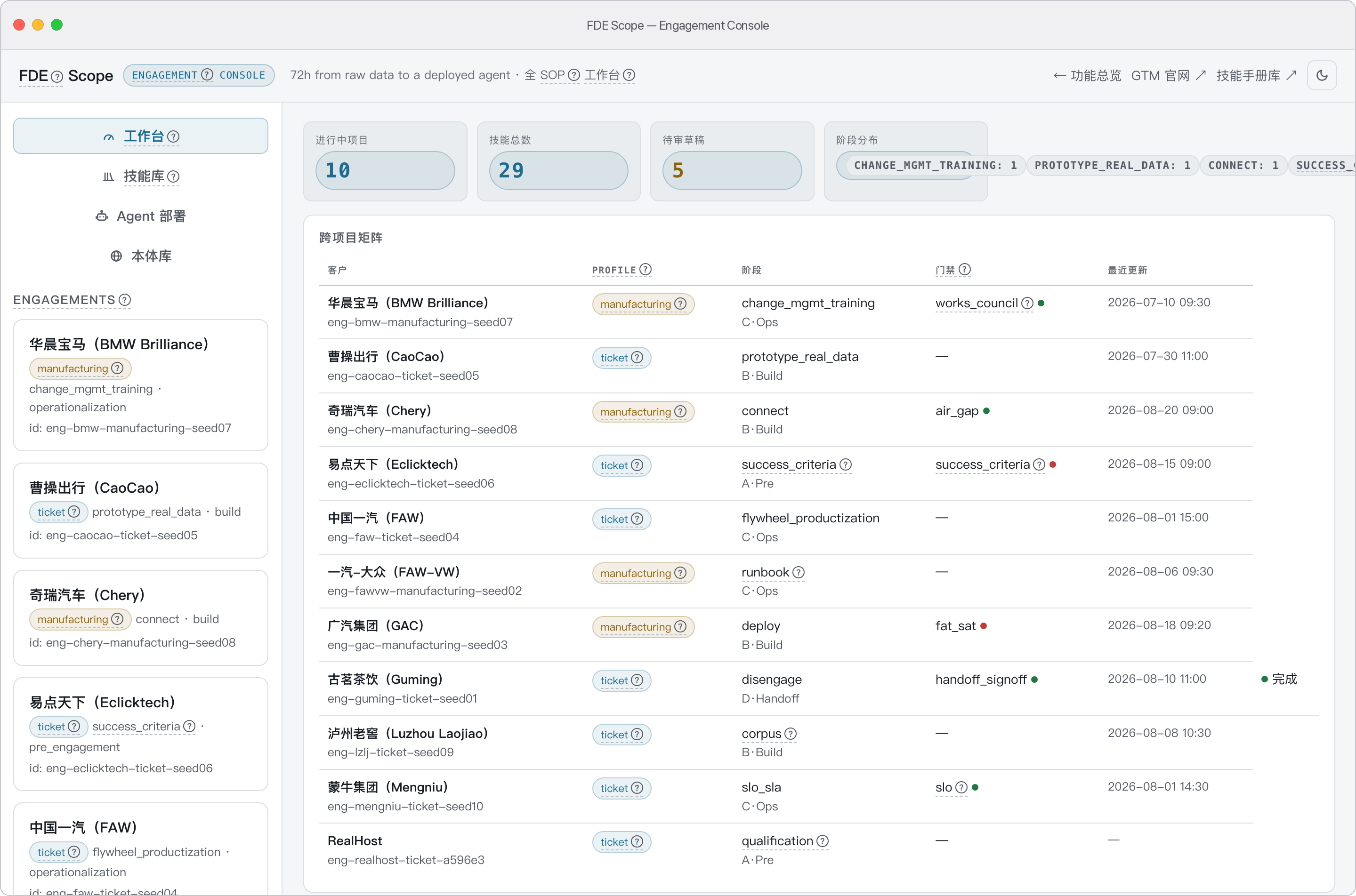
A single-page engagement console — no build step, backed by JSON APIs:
- Engagement dashboard — list / create engagements, advance through the
18-phase SOP (gates block in red when unmet), roll back, inspect blockers. - Gate inspector — evaluate any gate live against an engagement
(/api/engagements/{eid}/gates) with blocker/warning breakdown. - Guided mode(引导) — engagement 详情页「引导」tab,让没有 FDE 驻场的客户
自己走完 SOP:当前阶段白话说明 + 产出清单;gate blocker 翻译成「下一步做
什么」;技能手册库本地深链(/catalog/)。AI 起草 context(现场/干系人/
成功标准/SLO,diff 预览后确认写入)与目标→阶段任务清单(勾选自动保存);
一切产出仍须过 gate 才算数。无 AI key 时回退手动填写表单。 - Context tab — six structured cards per engagement: site survey, stakeholder
map (with SPONSOR badges), success criteria, SLOs, functional-safety posture,
and artifacts (runbook / corpus report / eval metrics / drift monitoring). - Corpus forge — upload a CSV (≤ 10 MiB) and forge an auditable corpus report.
- KPI explorer — compute profile-specific KPIs over a sample set.
- Report browser —
/reports/serves generated runbooks and corpus HTML. - Agent deploy preflight — 🤖 Agent 部署 view (
/console#deploy): render
the per-tenant crew plan (role buckets, bound / unbound tools with reasons,
permission rules) via the samebuild_deploy_plan— no AgentScope import,
no model call. Linked from the overview page hero and Deploy tile. - Ontology 本体库 — read-only view (
/console#ontology): browse the built-in
TBox schemas (classes / properties / SKOS concept trees, cycle-safe rendering),
workspace ABox stores, and preview JSON-LD 1.1 exports via the same
implementation asfde-scope ontology export. - Reading pages, all local — SOP full text (
/sop), Level-1 course
(/course), glossary (/glossary), certification centre (/certification),
repo docs (/docs/, README plus 20 docs/ pages rendered locally), the skills
handbook portal (/catalog/) and the GTM site (/GTM/) are all mounted or
rendered in-app — the sidebar has no off-site jumps.
实机截图(macOS App · universal2 DMG,与 fde-scope web 同一控制台):
🧪 Mock demo data
pip install -e ".[dev]"
python examples/seed_mock_engagements.py   # idempotent; re-run to re-seed
fde-scope web                              # open the console, pick any engagement
Seeds .fde_scope/engagements/ with ten realistic engagements. All customer
names are fictional (Aurora Motors, Atlas Auto Alliance, Southbay Motors,
Northern Auto, Swift Ride, Adnova, Teaverse, Horizon Auto, Riverbend Spirits,
Whitelake Dairy) — invented for product demo only, not affiliated with any real
company. Every gate record is produced by the engine
itself (Engagement.evaluate_gate), so the console's gate panels and the
engagement context are always self-consistent. Each engagement also writes a
rendered runbook (reports/<slug>-runbook.md) and corpus report
(reports/<slug>-corpus.html) with real train/eval/test splits.
| Customer | Profile | Phase | Story |
|---|---|---|---|
| 茶语万象 Teaverse (tea-chain) | ticket | 15/15 disengage | Full handoff package, customer accepted |
| 亚特联汽车 Atlas Auto Alliance (automaker) | manufacturing | 11/18 runbook | 9/9 industrial gates passed (3 shifts + works council + PL d/SIL 2 + HAZOP) |
| 南湾汽车 Southbay Motors (automaker) | manufacturing | 9/18 deploy | FAT/SAT + functional safety + conformity genuinely BLOCKED → advance refused |
| 北疆汽车 Northern Auto (automaker) | ticket | 13/15 flywheel | Productization flywheel running |
| 迅捷出行 Swift Ride (ride-hailing) | ticket | 8/15 prototype | Real-data prototyping, SLO defined |
| 星澜科技 Adnova (outbound SaaS) | ticket | 3/15 success_criteria | Single-sponsor blocker — the Sponsor Collapse anti-pattern |
✅ Feature checklist
Everything below is executable code with tests — the
architecture guard suite pins the counts,
and docs/architecture-model/architecture-map.md
carries the full evidence index. 完整的中文功能清单(逐项说明、连接器成熟度、
"功能 → 优点"速查表)见 docs/features.md。
SOP engine
- [x] 18 phases across 4 zones (pre-engagement → build → operationalization → handoff);
ticketruns 15,manufacturingruns all 18 - [x] 10 executable gates, live re-evaluated on every
advance()— stale passes never count,--forcestill evaluates and records - [x] On-site journal (research / implementation / optimization) with one-click skill capture
Surfaces
- [x] CLI —
fde-scope(connect / corpus / deploy / eval / flywheel / engage / gate / skill / ontology / qwenpaw / handoff / kpi / web) - [x] Web console — FastAPI, 86 routes: workbench + engagement dashboard + guided mode(引导 tab:阶段引导 / AI 起草 context / 目标拆解)+ journal + skills + corpus forge + KPI explorer + ontology 本体库
- [x] QwenPaw PawApp — desktop plugin, 18 routes under
/api/fde-scope, 3 agent tools, skill provider - [x] macOS app — double-click DMG (universal2, signed/notarized release path, same console as
fde-scope web)
Data & intelligence
- [x] 10 connectors — CSV, Zammad, Salesforce, MySQL, OPC UA, MQTT-Sparkplug, ROS2 bag, MES (ISA-95), Historian, document parsers (PDF/Word/Excel/PPT)
- [x] Corpus forge — PII scrub → dedup → quality gate → coverage → gap-targeted synthesis → auditable HTML report
- [x] Eval — ticket metrics + industrial KPIs (OEE / MTBF / FPY / DPMO / grasp success / collision rate) + bad-case miner
- [x] Flywheel — concept→real event mapping, corpus backflow, retrain scheduler
- [x] Skills library — draft → published → archived, AgentScope + QwenPaw dual-format export
- [x] Ontology 语义层 — TBox schemas (fde-core + mfg-overlay ISA-95) + SKOS concept scheme + SHACL-lite validation (ONTO-* codes) + JSON-LD 1.1 export; wired into corpus coverage and skill search
- [x] Deploy — three-pillar runtime assembly on real AgentScope 2.0 (multi-agent, subagent templates, permission context, honest manifest)
- [x] Handoff — runbook + eval report + SLO + training material, customer sign-off package
- [x] Optional LLM — MiMo Token Plan or any OpenAI-compatible endpoint, via env var only (
get_llm_client()factory); every entry point falls back to deterministic rules
🏗 Architecture
flowchart TB
    subgraph surfaces["Surfaces · 四个入口,同一引擎同一数据根"]
        CLI["fde-scope CLI<br/>13 组命令"]
        WEB["web/ FastAPI 控制台<br/>86 路由 · 单页"]
        PAW["pawapp/ QwenPaw 插件<br/>/api/fde-scope · 18 路由"]
        MAC["macOS App<br/>universal2 DMG"]
    end

    subgraph engine["SOP engine · engagement/ + profiles/ · 零 AgentScope"]
        PH["18-phase 状态机<br/>4 zones · ticket 15 / mfg 18"]
        GT["10 executable gates<br/>每次 advance 实时重评"]
    end

    subgraph layers["Data & intelligence · 五层流水线"]
        L1["1 connectors/<br/>10 连接器"]
        L2["2 corpus/<br/>PII→去重→质量→补盲"]
        L3["3 deploy/<br/>AgentScope 2.0 装配 lazy"]
        L4["4 eval/<br/>工单指标 + 工业 KPI"]
        L5["5 flywheel/<br/>回流 + 重训调度"]
        L1 -->|"samples + schema"| L2
        L2 -->|"语料 + splits"| L3
        L3 -->|"被测 Agent"| L4
        L4 -->|"bad cases"| L5
        L5 -.->|"corpus 回流 · retrain"| L2
    end

    subgraph cross["Cross-cutting · 横切,全部可选"]
        SK["6 skills/<br/>方法论沉淀"]
        INT["7 integrations/<br/>QwenPaw + ACP"]
        ONT["8 ontology/<br/>TBox + ABox + JSON-LD"]
        LLM["llm.py<br/>可选 LLM 出口"]
    end

    CLI --> PH
    WEB --> PH
    PAW --> PH
    MAC --> PH
    PH --> GT
    PH -->|"按阶段调用"| L1
    ONT -.->|"概念对齐:覆盖率 / 技能检索"| L2
    ONT -.-> SK
    SK -.->|"skills_dirs 注册进 Toolkit"| L3
    LLM -.->|"失败回退规则"| L3
    INT -.-> PAW
怎么读这张图
- 实线 = 主数据流:连接器接原始数据 → corpus 锻成语料 → deploy 装配出真实
Agent → eval 用 KPI 证明价值 → flywheel 把现场学习回流到 corpus(虚线回边,
闭环重训)。五层各自可独立使用,组合起来是完整闭环。 - 四个表面 → 同一 SOP 引擎:CLI / Web / PawApp / macOS App 操作同一份
engagement 状态与数据根,任何入口的预检与门禁结果零分歧。 - 虚线 = 可选/横切:ontology、skills、LLM 都不挡主流程——没有它们流水线照样
跑通,这是"零门槛可验证"的架构来源。 PH --> GT门禁内嵌在状态机里:advance是唯一推进入口,门禁评估没有旁路。
| Layer | Module | Role | agentscope? |
|---|---|---|---|
| SOP | engagement/ |
18-phase state machine + 10 enforceable gates + handoff | ❌ |
| Profiles | profiles/ |
Scenario selector (ticket / manufacturing) | ❌ |
| 1 | connectors/ |
CSV, Zammad, Salesforce, MySQL, OPC UA, MQTT-Sparkplug, ROS2, MES, Historian + document parsers | ❌ (documents: lazy) |
| 2 | corpus/ |
PII scrub, dedup, quality gate, coverage, synthesis, report | ❌ |
| 3 | deploy/ |
Three-pillar runtime assembly (Agent / Permission / Workspace) on real AgentScope 2.0 | ✅ lazy |
| 4 | eval/ |
Ticket metrics + manufacturing KPIs (OEE/MTBF/FPY/…) + bad-case miner | ❌ |
| 5 | flywheel/ |
Concept→real event mapping + collectors + retrain scheduler | ❌ |
| 6 | skills/ |
Methodology capture (draft → published → archived, dual-format export) | ❌ |
| 7 | integrations/ |
QwenPaw bundle export + ACP adapter + manifest validator | ❌ |
| 8 | ontology/ |
Semantic layer: TBox schemas + SKOS concepts + ABox stores, SHACL-lite validation, JSON-LD 1.1 export | ❌ |
| Web | web/ |
FastAPI engagement console (86 routes, single-page, JSON APIs) | ❌ |
| PawApp | pawapp/ |
QwenPaw desktop plugin (18 routes under /api/fde-scope) |
❌ |
| Cross | llm.py · config.py · templates/ · paths.py |
Optional LLM egress (fallback), tenant config, Jinja reports, single data-root resolution | ❌ |
Repository layout
fde-scope/
├── fde_scope/            # the Python package — layers map to the table above
│   ├── engagement/       # 18-phase SOP state machine + 10 gates + handoff (no AgentScope)
│   ├── profiles/         # ticket / manufacturing scenario profiles
│   ├── connectors/       # 10 data-source connectors (CSV … Historian + document parsers)
│   ├── corpus/           # PII scrub → dedup → quality gate → synthesis → report
│   ├── deploy/           # three-pillar runtime assembly on AgentScope 2.0 (lazy import)
│   ├── eval/             # ticket metrics + industrial KPIs + bad-case miner
│   ├── flywheel/         # concept→real event mapping + retrain scheduler
│   ├── skills/           # methodology capture (draft → published → archived)
│   ├── integrations/     # QwenPaw bundle export + ACP adapter + manifest validator
│   ├── ontology/         # TBox schemas + SKOS concepts + ABox stores + JSON-LD export (data/*.yaml built-ins)
│   └── web/              # FastAPI engagement console (86 routes)
├── pawapp/               # QwenPaw desktop plugin (18 routes under /api/fde-scope)
├── appbuild/             # macOS app packaging (PyInstaller, universal2 DMG)
├── GTM/                  # product / GTM landing page (single-file HTML)
├── docs/                 # architecture, SOP, API mapping + 101-page skills catalog
│                         #   + github-resources/ (verbatim mirror + static portal)
├── examples/             # quickstart data + seed_mock_engagements.py
├── samples/              # sample datasets
├── reports/              # generated runbooks / corpus reports (produced by corpus & seed scripts)
├── scripts/              # guard scripts (skills-catalog check, …)
├── tests/                # pytest suite incl. tests/test_architecture_guard.py contracts
└── .github/workflows/    # CI + release pipelines
The 10 phase gates
| Gate | Applies | Checks |
|---|---|---|
site_survey |
🏭 | Site location required; empty assets / multi-shift without networks → warning |
success_criteria |
🏢 | Written criteria + ≥ 2 sponsors; sponsor without a success metric → warning |
fat_sat |
🏭 | FAT and SAT both passed, each signed off |
functional_safety |
🏭 | Achieved PL/SIL ≥ required; ISO 10218 assessed; hazard analysis mandatory (blocker) |
conformity |
🏭 | EU-AI-Act high-risk ⇒ CE marking + technical construction file + hazard analysis |
works_council |
🏭 | Works-council approval signed off when representatives exist |
air_gap |
🏭 | Offline deployment posture settled at connect time (not phone-home) |
shift_handover |
🏭 | Multi-shift sites need digital handover log + per-shift runbook |
slo |
🏢 | SLO/SLA + error budget + alert route (missing route → warning) |
handoff_signoff |
🏢 | Handoff package: runbook + eval report + SLO + training material, customer accepted; boundary (G7③) / termination (G7④) missing → warning, never a blocker |
Gates are executable code, not checklists, and the difference is mechanical
rather than rhetorical:
- A checklist is a record; a gate is a predicate. A ticked box states what
was once true.Gate.check(ctx)re-derives the truth from the engagement
context at the moment you try to advance. - They decay in opposite directions. A checklist is freshest the day it is
filled in and rots as reality drifts.Engagement.advance()re-evaluates every
gate of the current phase unconditionally: a stale pass record never grants
passage, because the context may have changed since. - The enforcement point moves from discipline to mechanism. With blockers
present,advancerefuses and the state machine cannot move.--force
overrides authority but still evaluates and records, so even exceptions leave
an audit trail instead of becoming indistinguishable from a clean pass.
flowchart TD
    A["fde-scope engage advance(可带 --force)"] --> B["evaluate_phase_gates(ctx)<br/>当前阶段所有门禁 · 无条件实时重评"]
    B --> C{"blockers 为空?"}
    C -->|"是"| D["✅ 记录 pass → 放行进入下一阶段"]
    C -->|"否"| E{"带了 --force?"}
    E -->|"否"| F["⛔ 拒绝推进 · 返回 blockers 清单<br/>自动生成 gate_hint 技能草稿(skill review 完善)"]
    E -->|"是"| G["⚠️ 强制放行 · 仍评估并记录<br/>例外留下审计痕迹,不混同于干净通过"]
门禁执行流:advance 是唯一推进入口,评估内联其中——每一条路径都会评估并记录,
包括被 --force 打开的那条。
Concretely, Engagement(ctx).evaluate_gate(slug) returns
(passed, blockers, warnings) and blocks advance until clean.
See docs/architecture.md and
docs/fde_sop_full.md.
📐 Engineering best practices (enforced, not aspirational)
Seven invariants every change must preserve — AGENTS.md is the
machine-readable source, and the guard tests fail when they drift:
- Gate re-evaluation is live.
Engagement.advance()re-evaluates the
current phase's gates on every advance; no caching or short-circuits
aroundevaluate_phase_gates. - IDs are server-generated.
SkillRecord.id/EngagementContext.idare
assigned by the owning service — external input never sets them. - Credentials live in env vars only. Keys flow through
fde_scope/config.py; never persisted into manifests, reports,
engagement JSON or logs. - Persisted records are written atomically. Every on-disk user record
goes throughfsutil.atomic_write_text(temp file +os.replace). - Rule grants are the only permission channel.
build_toolkitnever
flags a deployed toolis_read_only(upstream ≥2.0.5 auto-allows read-only
calls); unmatched tools fall back by mode: DEFAULT→ASK, DONT_ASK→DENY. - The AgentScope window is measured, not aspirational.
pyproject.toml
anddocs/agentscope_api_mapping.mdmust quote the same specifier
verbatim (>=2.0.4.post1,<3today); re-measure per version before widening. - Web mutating 路由必须过认证依赖。 新增
web/路由时确认未被 auth
白名单(fde_scope/web/auth.py的PUBLIC_PATHS)误放;token 只从
FDE_SCOPE_API_TOKENenv 读。认证关闭只对回环生效:未设 token 时,
从非 loopback 地址到达的请求必须 403(中间件逐请求判scope["server"],
覆盖绕过 CLI 直接起服务的情形),CLI 另外拒绝无 token 的非回环绑定。
Verification anchors: make test ·
pytest tests/test_architecture_guard.py (contract pins) ·
pytest -m agentscope (real-library runtime) ·
ruff check && ruff format --check · data-root contract in tests/test_paths.py.
Architecture evidence model: docs/architecture-model/architecture-map.md.
🛠 CLI reference
connect   [Layer 1] Connect to a data source and preview schema + samples
corpus    [Layer 2] Forge a raw sample into an auditable, gap-aware corpus
deploy    [Layer 3] Assemble (and optionally start) a multi-tenant agent (multi-agent via --agent)
eval      [Layer 4] Run the FDE benchmark over a test set
flywheel  [Layer 5] Start (or replay into) the data flywheel
handoff   [Zone D]  Assemble the handoff / knowledge-transfer package
kpi       Profile-specific KPIs over a sample set
profiles  List available deployment scenario profiles
web       Launch the Web UI (workbench + skills + engagement console)
engage    [SOP] init / status / advance / rollback / journal / list
gate      [SOP] list (per profile) / check (per engagement)
skill     [Skills] 技能/方法论沉淀库(add / list / show / edit / publish / archive / review / export)
ontology  [Ontology] 本体语义层(list / validate / check / export — JSON-LD 1.1)
qwenpaw   [QwenPaw] Export / validate QwenPaw-compatible bundles (agents + skills + corpus)
license   [商业] 查看当前许可 tier / 到期 / 功能开关;license-issue 签发客户 key
storage-migrate [存储] engagement 持久化 file → sqlite 单向迁移
🤖 多 Agent 生产(AgentScope 2.0)
装配即真实 Agent。 tenant_config.yaml 的 agents 段(或 CLI
--agent 名字:角色[:模型])声明一个 tenant 的多个 Agent;fde-scope deploy
为每个 spec 组装一个真实的 agentscope.agent.Agent:模型 wiring(spec.model,
缺省留运行时注入)+ 角色工具真 Toolkit + AgentState(permission_context=...)
规则注入 + ReActConfig(max_iters=20),manifest 携带完整 agents 段与
subagent_templates。
FDE 自己开 Agent,三个通道(名字任意,中文可用):
# 通道 1 · CLI:--agent 可重复;角色是自由文本,自动归入 数据/日志/文件 工具桶
fde-scope deploy --tenant acme \
  --agent 数据员:数据分析 --agent 日志员:日志分析:qwen3-14b \
  --connector-source csv=examples/quickstart_csv/sample_tickets.csv
# 通道 2 · YAML:TenantConfig.agents 声明 + TenantConfig.sources 绑连接器数据源
# 通道 3 · 单 Agent 覆盖:spec.toolkit["sources"] / ["skills_dirs"]
#          (该 Agent 专属数据源与挂载技能,技能经 Toolkit(skills_or_loaders=...) 注册)
角色未匹配任何桶时退化为 corpus-only;没配数据源的连接器工具在 manifest 里
诚实标注 unbound 及原因,不假装可用。
协调走 2.0 官方机制:每个 Agent 同时导出 agentscope.app.SubAgentTemplate
蓝图进真实 create_app(custom_subagent_templates=...);leader 通过
AgentCreate 按 subagent_type 派活、成员经 TeamSay 回报(CI 真库测试覆盖)。
装配 ≠ 服务:不带 --serve,deploy 输出真对象装配 + 诚实 manifest
(dry-run / 审计友好);deploy --serve(build_app() + uvicorn)起真实
多 Agent 服务,需要 .[agentscope] extra + Redis + 可达模型。生命周期:
2.0 无 Agent.stop,TenantDeployer.stop() 关闭 workspace/engine 句柄并
标记 manifest。
子 Agent 配置方法速查
| 配置项 | 位置 | 说明 |
|---|---|---|
| Agent 列表 | TenantConfig.agents / CLI --agent |
每条 AgentSpec(name, role, system_prompt?, model?, toolkit?) |
| 数据源 | TenantConfig.sources / CLI --connector-source slug=value |
connector slug → 物理源(文件路径 / DSN / URL) |
| 单 Agent 覆盖 | spec.toolkit["sources"] / ["skills_dirs"] |
该 Agent 专属数据源与挂载技能 |
| 审批策略 | TenantConfig.approval_policy.mode |
conservative / balanced / autonomous |
| 预检 | Web POST /api/deploy/plan · PawApp /deploy/plan · deploy --dry-run |
同一 build_deploy_plan,纯数据不 import AgentScope |
注意事项
- 角色是自由文本,但决定工具桶。
canonical_role()按中文关键词把角色
归入 数据/日志/文件 桶并派生连接器集;匹配不上任何桶时退化为
corpus-only(只有语料工具)。想要某个连接器,角色词要沾边或显式覆盖
spec.toolkit。 - 数据源解析有优先级:per-agent
spec.toolkit["sources"]→ tenant
sources→ 隐式字段(ticket profile 下ticket_api隐式喂给
zammad/salesforce)。三处都没配的连接器工具诚实标注 unbound 及原因,
不进 Toolkit、不假装可用——先看 plan 再上现场。 - 审批模式决定未匹配工具的命运:绑定的工具自动获得显式 ALLOW 规则;
未匹配工具在conservative/balanced下走 DEFAULT→ASK(HITL 确认),
autonomous下走 DONT_ASK→DENY。默认 deny 恒含
access_other_tenant/delete_any/exec_shell。绑定工具不标
read-only(上游 ≥2.0.5 会先于 allow 规则自动放行只读调用)。 skills_dirs必须指向真实存在、含 SKILL.md 的目录;技能经
Toolkit(skills_or_loaders=[...])注册,路径错了装配期即可发现。- 凭据只走环境变量(
FDE_SCOPE_MIMO_API_KEY等)——永远不进
tenant_config.yaml / manifest / 报告。 - 连接器 sample 工具每调用最多返回
MAX_TOOL_ROWS = 50行,大表预览
先小后大,不要拿它当导出通道。 --serve不是默认:需要.[agentscope]extra(窗口
>=2.0.4.post1,<3,扩窗前先实测)+ Redis 后端 + 可达模型;纯装配 /
dry-run / plan 零 AgentScope 依赖。2.0 无Agent.stop,停服用
TenantDeployer.stop()。
入口(三个渠道,同一 build_deploy_plan,输出零分歧):
- Web 控制台 —
fde-scope web→/console#deploy「🤖 Agent 部署」:
表单点名 Agent / 选 profile / 填数据源,直接出预检清单;总览页 hero 按钮
与 Deploy 模块卡都链向此处; - macOS App(QwenPaw PawApp) — 同款「🤖 Agent 部署」标签页,走
/api/fde-scope/deploy/plan,与 Web 控制台同一引擎; - CLI —
fde-scope deploy --tenant acme … --dry-run,同一预检的命令行形态。
🐾 QwenPaw 集成
fde-scope qwenpaw export --tenant acme --agent "researcher:调研员" --out qwenpaw-out
把 tenant 的 agent 拓扑导出为 QwenPaw 兼容产物(config.json 的 agents.profiles
多 Agent 声明 + workspaces/{agent_id}/agent.json + AGENTS.md persona +
published 技能包 + corpus 说明),qwenpaw validate --out ... 按官方规则校验
(必填字段 / agent id 规则 / SKILL.md frontmatter)。macOS App(PawApp)
内的「🤖 Agent 部署」标签页提供同款多 Agent 预检。ACP 适配:AcpEndpoint
基类把 FDE 能力暴露为 QwenPaw ACP runner(delegate_external_agent)。
详见 docs/qwenpaw_integration.md。
💡 Skill 沉淀(Skills / Methodology capture)
FDE 在现场的每一步(调研、实施、调优、方法论)都可以沉淀为可复用的技能,跨 engagement、跨客户复用。技能存为文件库 .fde_scope/skills/(每个技能一个目录:skill.md + meta.json),随项目携带,零数据库依赖。
三种沉淀入口:
| 入口 | 触发方式 | 说明 |
|---|---|---|
| 手动 | fde-scope skill add |
随时沉淀,四类分类(research / implementation / optimization / methodology)+ 标签 |
| gate 阻塞提示 | engage advance / gate check 失败时自动 |
生成预填草稿(gate_hint),skill review 完善 |
| 操作自动捕获 | engage advance 成功 / gate check 通过时自动 |
轻量记录(auto_capture),skill review 完善 |
生命周期: draft → published → archived。skill review 审阅草稿队列 → skill publish → 可检索、可导出。
导出给 Agent: 支持 AgentScope 2.0 与 QwenPaw 两种格式(Anthropic Agent Skills 规范:<skill-name>/SKILL.md,frontmatter 含 name + description)。AgentScope 侧经 Toolkit(skills_or_loaders=[...])(部署装配的 AgentSpec.toolkit.skills_dirs)注册进真实 Toolkit;QwenPaw 侧放入 customized_skills 目录自动发现。
fde-scope skill add --title "OPC UA 连接踩坑" --category implementation --tags opcua --body "# 步骤..."
fde-scope skill review                  # 审阅自动捕获/gate 提示产生的草稿队列
fde-scope skill publish <skill-id>
fde-scope skill list --category implementation --tag opcua
fde-scope skill export <skill-id> --format qwenpaw --out exports/   # 或 --format agentscope
Web UI 暴露完整的 skills API:GET/POST /api/skills、GET/PATCH /api/skills/{id}、POST /api/skills/{id}/publish|archive|export、GET /api/skills/drafts。
🖥️ FDE 工作台(Workbench + 现场记录)
fde-scope web 打开的单页控制台现在是一个跨项目工作台:
- 工作台首页(
/console):全局统计条(进行中项目 / 阶段分布 / 待审草稿 / 技能总数)、
跨项目矩阵(客户/阶段/zone/门禁/最近更新,点击进入详情)、最近沉淀技能; - 技能库页(
/console#skills):搜索 + 分类/状态筛选 + 技能卡片 +
新建技能表单 + 草稿审阅队列(一键发布/编辑); - 现场记录(详情页 tab):
research / implementation / optimization三类记录,
任意一条可一键“沉淀为技能”(kind → category 自动映射、关联来源 engagement)。
CLI 等价入口:fde-scope engage journal <id> --kind research --note "..." [--link-skill <sid>]。
🤖 LLM 接入(可选)
核心层零 LLM、零额外依赖:语料合成、质量评分、eval 回复、runbook 生成全部默认走确定性规则路径,只有设置了环境变量才启用 MiMo Token Plan(OpenAI 兼容协议,标准库 urllib 直连,无新依赖)。
# Token Plan 凭据(tp- 前缀,与按量付费 sk- 不通用)
export FDE_SCOPE_MIMO_API_KEY="tp-..."
# 可选:默认已是 https://token-plan-cn.xiaomimimo.com/v1 与 mimo-v2.5-pro
export FDE_SCOPE_MIMO_BASE_URL="https://token-plan-cn.xiaomimimo.com/v1"
export FDE_SCOPE_MIMO_MODEL="mimo-v2.5-pro"

# 或:任意 OpenAI 兼容端点(vLLM / OpenAI / DeepSeek …,标准 Bearer 头)。
# 两个变量都设置时优先于 MiMo;模型缺省 gpt-4o-mini
export FDE_SCOPE_LLM_BASE_URL="http://localhost:11434/v1"
export FDE_SCOPE_LLM_API_KEY="sk-..."
export FDE_SCOPE_LLM_MODEL="qwen3:14b"

# 日志级别(默认 WARNING):DEBUG 可看到 gate 评估/forge 细节
export FDE_SCOPE_LOG_LEVEL="INFO"

# Zammad 连接器(ticket profile):两个都设置才启用真实 HTTP API
# (/api/v1/tickets 分页拉取);只设一个或都不设时回退本地 .jsonl source
export FDE_SCOPE_ZAMMAD_BASE_URL="https://support.example.com"
export FDE_SCOPE_ZAMMAD_API_TOKEN="..."

# Salesforce 连接器(ticket profile):SOQL 只读查询 Case 对象;
# access token 直配(在进程外获取),两个都设置才启用真实 REST API
export FDE_SCOPE_SF_INSTANCE_URL="https://acme.my.salesforce.com"
export FDE_SCOPE_SF_ACCESS_TOKEN="..."

# MES / Historian 连接器(manufacturing profile):两个变量都设置才启用真实 REST API
export FDE_SCOPE_MES_BASE_URL="https://mes.example.com"
export FDE_SCOPE_MES_API_TOKEN="..."
export FDE_SCOPE_HISTORIAN_BASE_URL="https://historian.example.com"
export FDE_SCOPE_HISTORIAN_API_TOKEN="..."

# 商业许可(可选):不设置即 community tier;签发走 fde-scope license-issue
export FDE_SCOPE_LICENSE_SECRET="..."   # 签发方持有,验签用
export FDE_SCOPE_LICENSE_KEY="..."      # 客户侧设置

# 存储后端(可选):默认 file(JSON 原子写);sqlite 启用 WAL 单文件库
export FDE_SCOPE_STORAGE="sqlite"

# 飞轮训练后端(可选):不配置则 noop(如实标注)
export FDE_SCOPE_TRAINING_URL="https://training.example.com"
export FDE_SCOPE_TRAINING_TOKEN="..."
所有 LLM 入口都是失败自动回退规则路径——网络错误、坏 JSON、无 key 都不会中断流水线:
| 入口 | 启用方式 | 效果 |
|---|---|---|
| 语料合成 | fde-scope corpus --input … --llm |
每个缺口类别由 LLM 生成真实感样本(参考种子风格,JSON 输出) |
| 质量评分 | 同上(合成后自动) | LLM 对样本打 1-5 质量分,规则分兜底 |
| Eval 基准 | fde-scope eval --agent mimo --test-set … |
用 MiMo 充当被评测的客服 Agent(MiMoReplyFn) |
| 部署清单 | fde-scope deploy --tenant … |
manifest 携带 llm 段(provider/model/base_url) |
| Runbook | fde-scope handoff <id> --llm |
按客户/profile/阶段/SLO 生成 runbook,失败回退模板 |
| Web 控制台 | 自动 | /api/forge 有 key 即启用 LLM 合成,无需配置 |
FDE_SCOPE_MIMO_API_KEY 未设置时:corpus --llm / eval --agent mimo / handoff --llm 会明确报错(exit 2)提示配置,其余命令静默走规则模式。凭据只经环境变量传递,请勿写入任何 git 文件。
协议细节、六个接入点的回退语义、成本模型、测试策略与多 provider 扩展指南见
docs/llm_integration.md;LLM 路径的加固记录与评审案例库见
docs/code_review_checklist.md。
🧪 Tests
pip install -e ".[dev]"
pytest                 # CI badge (top) shows current pass/skip status.
                       # Coverage: core + engagement + gates + skills + web + integrations + LLM mock + PawApp.
                       # No agentscope/mysql/opcua/LLM-key/QwenPaw needed locally (skips are integration-only);
                       # real-AgentScope runtime tests live under the `agentscope` marker (CI dedicated job).
pytest -m agentscope   # 仅真库运行时测试(需 pip install -e ".[agentscope]")
pytest --cov=fde_scope --cov-report=term-missing   # ~89% coverage
CI (GitHub Actions) runs the same suite on Python 3.11 + 3.12 with ruff lint
(check + format --check), mypy, and an sdist/wheel build — see
.github/workflows/ci.yml.
📦 Installation
pip install -e "."                 # core only
pip install -e ".[dev]"            # + pytest + web test client
pip install -e ".[web]"            # + FastAPI/uvicorn console
pip install -e ".[agentscope]"    # + real AgentScope 2.0 runtime layer
pip install -e ".[mysql]"          # + MySQL connector driver
pip install -e ".[opcua]"          # + OPC UA connector driver (asyncua)
pip install -e ".[mqtt]"           # + MQTT-Sparkplug live broker driver (paho-mqtt)
pip install -e ".[ros2]"           # + ROS2 bag replay driver (rosbags)
pip install -e ".[full]"           # everything (dev + agentscope + mysql + opcua + mqtt + ros2 + web)
Requires Python ≥ 3.11. Entry point: fde-scope (or python -m fde_scope.cli).
macOS App(双击即用)
./appbuild/build_release.sh # universal2 app + DMG → appbuild/dist/
产出 ad-hoc 签名的 FDE-Scope-<ver>-universal2.dmg(含同版本 .zip、SHA256SUMS 与
manifest.json 溯源清单;单实例守护、健康检查、崩溃兜底、SIGTERM 优雅退出)。
ad-hoc 包首次打开被 Gatekeeper 拦时右键 → 打开;配置 DEVELOPER_ID_P12_* 与
NOTARY_API_KEY_* 后脚本自动改为 Developer ID 签名 + 公证。推送 v* tag 时
CI 自动出包(.github/workflows/release.yml)。
与 Web UI / QwenPaw PawApp 的关系: Mac App 没有自己的界面——
launcher.py 直接加载 fde_scope.web.app 的 FastAPI
对象跑在 127.0.0.1:8737,模板就是 fde_scope/templates 同一份,页面与
fde-scope web 完全一致;它只是加了一层双击入口(打包运行时 + 单实例守护 +
DMG 分发)。QwenPaw PawApp(pawapp/)则是同一引擎、同一数据根
目录之上的另一个原生前端:自带 APIRouter(宿主挂载 /api/fde-scope,
18 条路由)与 ui/index.js 面板,不复用 Web 页面。一句话:Mac App = web
控制台换个双击入口;PawApp = 同一引擎的另一个前端。
📄 Documentation
docs/enhancement-plan.md— 全面加强计划与进度台账:逐页逐功能加强项、每条带file:line证据、分期路线图(详见 加强计划)docs/features.md— 完整功能清单:18 阶段逐条说明 / 10 门禁执行流 / 连接器成熟度 / "功能 → 优点"速查表(English:docs/features-en.md)docs/user-guide.md— 客户侧快速上手:5 分钟跑通、核心概念、常用操作、env 速查、故障 FAQdocs/api-reference.md— Web 控制台 REST API 参考(认证 + 全路由逐条对照代码)docs/onboarding-customer.md— 客户现场 onboarding:部署形态、安全基线、数据/LLM 接入决策树、POC 验收模板docs/fde_sop_full.md— the 18-phase SOP, 12 anti-patterns, sourcesdocs/manufacturing_scenario.md— embodied-robotics factory end-to-end walkthroughdocs/architecture.md— layered design + data flowdocs/architecture-model/architecture-map.md— evidence-backed architecture views (L1/L2/L3) + health report + canonical DSL/DOT sourcesdocs/skills.md— 技能沉淀系统:数据模型 / 生命周期 / 三种入口 / 双格式导出docs/skills-catalog/README.md— 101 页 skill 手册库(Zone A–D + 横切 + MCP + 工具),门户site/index.html,make check-catalog门禁 /make build-site重建GTM/index.html— 产品 / GTM 落地页(仓库内单文件:定位、功能/架构/实践清单、实机截图)docs/llm_integration.md— MiMo Token Plan integration: 6 touchpoints, fallback semantics, cost model, testingdocs/qwenpaw_integration.md— QwenPaw 集成:配置两层结构 / 导出与校验 / PawApp 桌面形态pawapp/README.md— QwenPaw PawApp 安装/开发/API 契约docs/code_review_checklist.md— repeatable review workflow + bug case librarydocs/agentscope_api_mapping.md— design-doc fiction vs. real 2.0.x API (measured version matrix)docs/fde_playbook.md— on-site 72h playbookexamples/README.md— CSV cold-start walkthrough (quickstart data included)
🧭 加强计划(Enhancement Plan)
完整台账见 docs/enhancement-plan.md:逐页逐功能的加强项,每条都带
file:line 证据与验收动作。这里只放骨架与当前状态。
基线(实测,非估计):867 passed / 4 skipped / 92% 覆盖率 / 20.6s;ruff check 绿;
ruff format --check 与 mypy fde_scope 红(CI 阻塞步骤);Web 路由真实 57 条而文档写 56。
P0 收口后复测(同组命令):876 passed / 4 skipped / exit 0(+9 条新守卫);
ruff format --check → 174 files already formatted;mypy fde_scope → Success: no issues found in 101 source files;
路由数 11 处宣称全部对齐 57,且装饰器扫描与 app.openapi() 逐条对账;
干净 venv 装 wheel 后 /course 正常渲染(zh 770,509 字符),发行版不再空页。
本轮最高价值发现:evidence / handoff / audit / archive / delete 五项能力
后端已实现、测试已覆盖,但控制台前端从不调用;rollback 更是领域层与 CLI 都有、Web 层连端点都没有
——而 docs/features.md 已经宣称看板支持「回滚」。所以 P1 几乎全是「给已测后端接前端」,
不引入新领域逻辑,风险最低、收益最高。
| 期 | 状态 | 工作量 | 范围 | 出口标准 |
|---|---|---|---|---|
| P0 止血 | ✅ 已完成(9/9) | 0.5–1 天 | 9 项:格式/类型红、GTM 图片 401、GTM GitHub 假链、course-level-1/ 未打包、路由守卫漏 patch、favicon、嵌套 SVG、误提交的 .apk.idsig |
四条回归锚全绿 ✅ |
| P1 补齐已实现能力 | ✅ 已完成(§1.1–§1.3) | 3–5 天 | 回滚端点、11 tab、四确认框、skills 四筛选+facets、deploy 服务端解析、ontology 三子视图、Context JSON 编辑器、workbench 筛选、运维视图(连接器/eval/flywheel/license,env 只报布尔)、flywheel CLI 假计划修复、鉴权全量枚举守卫、favicon 死链修复(落地记录见计划 §1.1–§1.3) | 每项都有 UI 和测试;文档宣称变成事实 ✅ |
| P2 页面质量 | ✅ 已完成 | 5–8 天 | glossary 搜索+转义、course 进度/勾选/搜索/token 流统计、sop token rail+EN 标签、docs TOC+href 白名单+mdrender 抽取、catalog a11y+暗色+⚰️ chip、首页磁贴注册表化、i18n 键漂移守卫、CLI C1–C12(--version、9 命令 --json、spinner、友好错误、公共 agent 解析/门禁访问器)(落地记录见计划 P2 节);C13 help 全文双语留独立批次 |
每页至少一项导航增强 ✅;CLI 可脚本化 ✅ |
| P3 工程化 | 🔄 主体完成(Q2/Q4/Q5/§12 部分待立项) | 8–12 天 | ✅ 覆盖率门禁(fail_under=90,实测 92.08%)、未测路由/分支补齐(连带修 context 字段路径缺陷)、macOS CI 冒烟、文档零漂移(5 处);⬜ CI service containers、前端 JS 抽出+DOM 测试、app.py 拆分、PawApp 共享层(落地记录见计划 P3 节) |
门禁生效 ✅、文档不再漂移 ✅、巨石拆分 ⬜ |
| P4 独立立项 | [-] 本轮不做 | — | 多租户/RBAC/SSO、PII 字段级加密与保留期、数字签名、真实训练管道、真实连接器 POC | 不在本轮 |
红线:所有加强都受 AGENTS.md 七条不变式约束。计划文档 §15 逐条列出
「哪条不变式约束了哪条加强」,以及本轮明确不做的 6 件事(含「审计证据是 sha256 文件哈希,
不是数字签名,不得在文档里说成签名」)。
🤝 Contributing
Issues and pull requests are welcome. Fastest path to a green PR:
pip install -e ".[dev]"
pytest -q                                    # full suite
ruff check fde_scope tests && ruff format --check fde_scope tests
pytest tests/test_architecture_guard.py      # contract guards
Ground rules — AGENTS.md is the machine-readable source:
- Don't weaken the seven invariants above; the guard tests fail on purpose when they drift.
engagement/phases.py(18 phases) and the default gate registry (10 gates) are contract-pinned: changing them requires a deliberate contract update and a description indocs/.- Credentials flow through environment variables only — never persisted into manifests, reports, engagement JSON or logs.
- Large or risky changes: open an issue / draft PR first so the invariants can be discussed before code lands.
🗺 Roadmap
- [x] OPC UA 真实工业 IO(asyncua 驱动,mock 测试覆盖)
- [x] Category-stratified train/eval/test split(
CorpusReport.splits) - [x] MQTT-Sparkplug 真实 broker IO(paho-mqtt 驱动,mock + 真 broker 测试)
- [x] rosbag2 真实回放(rosbags)
- [x] Ontology 模块(横切语义层:TBox + ABox、SKOS 概念体系、SHACL-lite 校验 ONTO-* 错误码、JSON-LD 1.1 标准导出、零新依赖)— 设计文档 · 使用指南
- [x] Real LLM corpus synthesis & quality scoring (drop-in behind existing signatures)
- [x] 小米 MiMo Token Plan 接入(
fde_scope/llm.py,env 配置,失败回退规则) - [x] Skill 沉淀库(四类分类 + 生命周期 + AgentScope/QwenPaw 双格式导出)
- [x] 多 Agent 生产(真实 Agent 装配 + 模型 wiring + SubAgentTemplate 蓝图 + FDE 三通道自开 Agent)
- [x] QwenPaw 集成(qwenpaw export/validate + PawApp 桌面应用,真机验证通过)
- [x]
deploy --serve端到端实测(Redis 后端 + fake OpenAI 兼容模型,2026-09-28 本机 PASS,agentscope 2.0.8;见deploy/e2e/) - [x] Zammad HTTP API 连接器(
/api/v1/tickets+ Token 认证,env 配置,JSONL 回放兜底) - [x] Salesforce REST 连接器(SOQL
query+ Bearer 认证,只读,env 配置,JSONL 回放兜底) - [x] Full MES / Historian HTTP/SQL implementations(MES work-orders REST、Historian 时序 samples REST,均 env 配置 + JSONL 回放兜底)
- [x] 离线 License 模块(HMAC-SHA256 签名 key,community/pro/enterprise 三档功能开关,
fde-scope license/license-issue,web 层审计导出与证据留存门控 pro+) - [x] 存储后端抽象(
FDE_SCOPE_STORAGE=file|sqlite;SQLite 走 stdlib + WAL,fde-scope storage-migrate迁移工具) - [x] 飞轮训练后端接口(
TrainingBackendProtocol:HTTP webhook 后端 env 配置 + 显式 noop 兜底) - [ ] AgentScope Studio (npm
@agentscope/studio) integration
📄 License
MIT.
🙏 Acknowledgements
- AgentScope 2.0 — the multi-agent runtime under the deploy layer (three-pillar assembly).
- QwenPaw — the desktop PawApp host targeted by our plugin (see QwenPaw 集成).
- MiMo Token Plan — optional LLM egress, env-var configured with deterministic fallback (see LLM 接入).
- Ruff — lint & format enforcement across the codebase.